
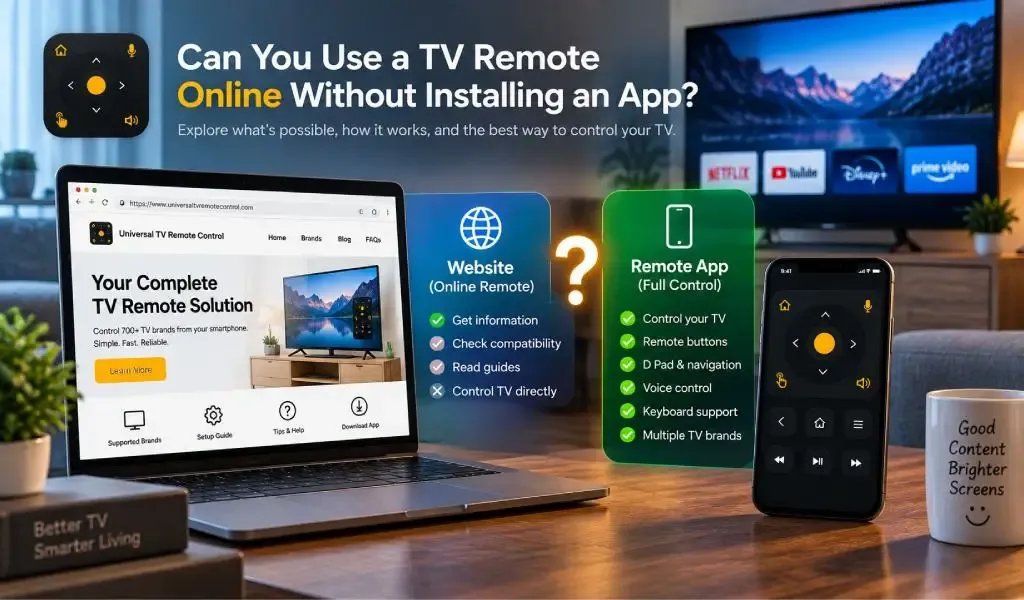
Di solito non puoi usare un sito web da solo come telecomando TV completo senza installare un'app o usare un altro metodo di controllo supportato. Un sito può aiutarti a trovare una soluzione di telecomando, verificare la compatibilità della TV, leggere le istruzioni di configurazione o scaricare un'app, ma il controllo effettivo dal smartphone richiede normalmente un metodo di comunicazione in grado di raggiungere il televisore.
La confusione nasce da ricerche come "telecomando TV online", "telecomando universale online" e "sito web telecomando TV". Queste frasi possono far sembrare che basti aprire un sito, premere qualche pulsante e controllare la TV direttamente dal browser.
Per la maggior parte delle smart TV moderne, il controllo remoto non funziona così.
Il browser è soprattutto il livello informativo. L'app del telecomando o la connessione supportata del dispositivo è il livello di controllo.
Un sito web di telecomando TV di solito non può sostituire un'app del telecomando
Un sito web di telecomando TV di solito fornisce informazioni e accesso a una soluzione di telecomando, piuttosto che funzionare come telecomando vero e proprio.
Un sito può dirti se una determinata marca di TV è supportata, spiegare come funziona il controllo dal telefono, fornire istruzioni di configurazione, rispondere a domande sulla compatibilità e indirizzarti all'applicazione appropriata.
Un'app del telecomando dedicata ha un ruolo diverso. Può comunicare con la TV tramite una connessione supportata e trasformare il telefono in un controller interattivo.
La documentazione ufficiale di Android TV di Google, ad esempio, spiega che gli utenti possono usare l'app Google TV come telecomando virtuale e associare il telefono alla TV usando un codice visualizzato sul televisore.
Anche Samsung indirizza gli utenti verso SmartThings per il controllo della TV dal smartphone e richiede l'installazione dell'applicazione prima di usare il telecomando mobile.
Quindi, se trovi un sito che pubblicizza un "telecomando universale online", non dare per scontato che la pagina web possa controllare direttamente il tuo televisore.
Potrebbe interessarti: Sito web Universal TV Remote Control vs app del telecomando: qual è la differenza?
Un telecomando TV basato sul browser è possibile solo quando il sistema TV lo supporta specificamente
Un browser può controllare una TV solo quando il televisore o il dispositivo collegato offre un'interfaccia di controllo web compatibile.
Non è la configurazione normale per le smart TV consumer.
La maggior parte degli ecosistemi TV mainstream è progettata attorno ad applicazioni mobili dedicate, funzioni di telecomando integrate, accessori Bluetooth, controlli a infrarossi o comunicazione sulla rete locale.
Ad esempio, Google offre la funzionalità di telecomando virtuale tramite l'app Google TV, mentre Samsung offre il controllo remoto mobile tramite SmartThings. Apple fornisce Apple TV Remote tramite Control Center su iPhone e iPad compatibili.
Questo significa che una soluzione basata sul browser va trattata come un caso speciale, non come il modo standard per controllare una smart TV.
La domanda importante non è semplicemente se esiste un sito web. La domanda è se la tua TV offre un'interfaccia di comunicazione che un browser può effettivamente usare.
Un'app del telecomando TV comunica normalmente con la TV tramite la rete locale
Un'app del telecomando TV usa normalmente un percorso di comunicazione supportato tra telefono e televisore, con il WiFi tra i metodi più comuni per le smart TV.
In una configurazione tipica, telefono e TV si collegano alla stessa rete locale. L'app rileva o associa il televisore e poi invia i comandi di controllo attraverso quella connessione.
Google afferma esplicitamente che il suo telecomando virtuale richiede che telefono e TV siano sulla stessa rete WiFi.
Anche Apple istruisce gli utenti a collegare iPhone o iPad e Apple TV o smart TV AirPlay compatibile alla stessa rete WiFi quando si configura Apple TV Remote.
Questa è una distinzione importante perché "online" e "basato su internet" non sono sempre la stessa cosa.
Il telefono può usare internet per visitare un sito web, mentre l'app del telecomando comunica direttamente con la TV sulla rete locale.
Un telecomando universale online non significa necessariamente un controllo TV basato su internet
"Telecomando universale online" di solito descrive come qualcuno cerca o trova una soluzione di telecomando, non necessariamente come il telecomando comunica con la TV.
Ad esempio, potresti cercare su Google un telecomando universale, visitare un sito, scaricare un'app e poi controllare la TV sulla rete WiFi locale.
Il sito web ha usato internet.
La connessione del telecomando ha usato la rete locale.
Queste sono due fasi diverse dell'esperienza.
Questa distinzione è particolarmente importante perché gli utenti a volte pensano che un telecomando TV debba inviare comandi tramite internet. In molte configurazioni comuni di smart TV, non è necessario.
La comunicazione locale può essere sufficiente per lo scambio di comandi tra telefono e TV, se televisore e applicazione supportano la connessione richiesta.
Di solito serve un'app del telecomando perché il telefono deve accedere alla comunicazione con il dispositivo
Un browser è pensato principalmente per accedere ai contenuti web. Una applicazione del telecomando è pensata per interagire con i dispositivi e usare le capacità del sistema operativo mobile.
Questa differenza conta.
Un'app del telecomando può essere progettata per rilevare TV compatibili, gestire l'associazione, mantenere la connessione appropriata, mostrare i controlli, richiedere l'accesso alla rete locale e rispondere ai requisiti di comunicazione della TV.
Un sito web non riceve automaticamente queste capacità solo perché viene aperto in un browser.
I moderni sistemi operativi mobili impongono anche restrizioni sull'accesso ai dispositivi vicini e alle reti locali. Una applicazione dedicata può essere progettata specificamente per questi requisiti.
Questo è uno dei motivi per cui l'app è generalmente la scelta più pratica per il controllo quotidiano della TV.
Un telecomando fisico può ancora funzionare quando una app per telefono non è adatta
Il telefono non è l'unico modo per controllare un televisore senza il telecomando originale.
Un telecomando fisico universale compatibile può essere programmato per TV supportate. Alcuni smartphone includono anche hardware a infrarossi, permettendo di inviare comandi direttamente a televisori compatibili senza dipendere da una connessione remota basata su WiFi.
Gli infrarossi funzionano diversamente dal controllo di rete delle smart TV perché il comando viaggia direttamente dal trasmettitore alla TV.
Il limite è che la maggior parte degli smartphone moderni non include un trasmettitore a infrarossi.
Questo rende il controllo smartphone basato su WiFi più rilevante per i telefoni attuali, soprattutto quando la TV è già collegata a una rete domestica.
Una TV può avere anche funzioni di telecomando integrate
Alcuni ecosistemi televisivi includono la propria funzionalità di telecomando come parte di una piattaforma più ampia.
Samsung, ad esempio, offre il controllo remoto mobile tramite SmartThings. La documentazione attuale di Samsung indica che le TV supportate possono essere controllate dal telefono, incluse funzioni come cambio canale, regolazione del volume e navigazione nelle funzioni TV.
Google offre un telecomando virtuale tramite l'app Google TV per dispositivi Google TV e Android TV compatibili. Il suo telecomando può gestire funzioni come riproduzione multimediale, volume, inserimento di testo e accensione/spegnimento della TV, dove supportato.
Apple fornisce Apple TV Remote tramite Control Center per Apple TV e smart TV AirPlay compatibili.
Questi esempi mostrano perché non esiste una risposta unica valida per ogni televisore.
La piattaforma TV determina quali metodi di controllo sono disponibili.
Un'app di telecomando universale è più utile quando le TV provengono da marche diverse
Una soluzione di telecomando specifica per marca può funzionare molto bene quando usi solo l'ecosistema di un produttore.
La situazione cambia quando in casa ci sono TV di produttori diversi.
Potresti avere una TV Samsung in soggiorno, una TV LG in camera, un televisore TCL in un'altra stanza e una configurazione basata su Roku altrove.
Installare e mantenere una diversa applicazione del telecomando per ogni ecosistema può diventare scomodo.
Un'app di telecomando universale adotta un approccio più ampio supportando più marche di televisori da un'unica applicazione.
Universal TV Remote Control supporta più di 700 marche di TV ed è disponibile in più di 100 paesi. Ha anche superato i 130M+ download.
Questa ampia compatibilità la rende particolarmente rilevante per chi non vuole legare l'esperienza del telecomando a un solo produttore.
Un'app di telecomando universale offre più dei controlli base di canale e volume
Un telecomando moderno basato sul telefono può offrire funzioni difficili da riprodurre con una semplice pagina del browser.
Universal TV Remote Control include D Pad navigation, controllo vocale e supporto della tastiera.
D Pad navigation è utile per spostarsi nei menu e nelle app della smart TV. Il supporto della tastiera è utile quando cerchi film, inserisci password o digiti nelle interfacce TV. Il controllo vocale può offrire un altro modo per interagire con le funzioni supportate.
Queste capacità rendono lo smartphone più di un semplice sostituto dei pulsanti fisici di un telecomando tradizionale.
Diventa un'interfaccia di controllo flessibile per la smart TV.
L'interfaccia intuitiva è importante anche perché un telecomando dovrebbe rendere le azioni comuni più facili, non costringere gli utenti a menu complicati prima di cambiare il volume o navigare nella TV.
Un sito web resta importante perché aiuta gli utenti a trovare il telecomando giusto
Un sito web potrebbe non sostituire l'app del telecomando, ma questo non lo rende meno importante.
Per molti utenti, il sito web è il primo passo per risolvere un problema con il telecomando.
Qualcuno potrebbe cercare:
sito web telecomando TV
Poi:
telecomando universale online
Poi:
Posso controllare la TV dal telefono?
Il sito dovrebbe rispondere a queste domande e spiegare cosa fare dopo.
Un sito utile di telecomando universale può fornire:
- Marche TV supportate
- Disponibilità per Android e iPhone
- Informazioni di configurazione
- Requisiti WiFi
- Informazioni sulla compatibilità
- Spiegazioni delle funzioni
- Guida alla risoluzione dei problemi
- Link per il download
- Informazioni sull'assistenza clienti
Questo crea un percorso chiaro dalla ricerca all'installazione fino al controllo effettivo della TV.
Un sito web di telecomando universale e l'app lavorano insieme piuttosto che competere
Un sito web e un'app risolvono parti diverse dello stesso problema.
Il sito aiuta gli utenti a scoprire il prodotto e capire come funziona.
L'app fornisce l'interfaccia del telecomando vera e propria.
Questa distinzione spiega anche perché una ricerca di "sito web telecomando universale" non dovrebbe necessariamente far aspettare un controllo TV dal browser.
L'esperienza migliore è:
Cerca online
↓
Verifica la compatibilità
↓
Comprendi il metodo di connessione
↓
Installa l'app appropriata
↓
Collega il telefono alla TV
↓
Usa il telefono come telecomando
Il sito gestisce le prime fasi. L'applicazione gestisce l'esperienza finale di controllo.
Universal TV Remote Control è pensato per una gamma più ampia di configurazioni TV
Universal TV Remote Control è costruito sull'idea che gli utenti non debbano avere un'esperienza di telecomando separata per ogni marca di televisore.
L'app supporta più di 700 marche di TV, ha più di 130M+ download ed è disponibile in più di 100 paesi.
Le sue funzioni includono D Pad navigation, controllo vocale, supporto della tastiera e un'interfaccia intuitiva.
Questa combinazione è particolarmente utile per le famiglie in cui TV diverse usano marche o piattaforme diverse.
Offre anche più flessibilità rispetto a un'interfaccia di telecomando di base. Invece di limitare l'esperienza a pulsanti di accensione, volume e canale, l'app può fornire navigazione e inserimento di testo utili con le interfacce delle smart TV moderne.
Un'assistenza clienti solida è un'altra parte pratica dell'esperienza di telecomando universale. La compatibilità TV può dipendere dal modello specifico, dal sistema operativo, dal telefono e dall'ambiente di connessione, quindi avere supporto disponibile può essere utile quando una configurazione non si comporta come previsto.
L'app non può aggirare i limiti imposti da un produttore di TV o dal sistema operativo mobile. Quello che può offrire è una soluzione di telecomando più ampia pensata per un'ampia gamma di televisori compatibili.
Leggi anche: Autorizzazione Local Network di Android 17: cosa devono sapere le app del telecomando TV
Un'app del telecomando TV è di solito la risposta pratica quando vuoi il controllo dal telefono
Un sito web di telecomando TV è utile per trovare informazioni, verificare la compatibilità e accedere a una soluzione di telecomando, ma un'app dedicata è di solito la scelta pratica quando vuoi davvero controllare il televisore dal telefono.
Il controllo basato sul browser è possibile in ecosistemi specifici che offrono un'interfaccia web compatibile, ma non è l'approccio normale per le smart TV mainstream.
Per la maggior parte degli utenti, la distinzione è semplice:
Un sito web ti aiuta a trovare il telecomando.
Un'app collega il telefono alla TV.
Il metodo di comunicazione determina come funziona effettivamente il controllo.
Se hai una TV che supporta il controllo dal smartphone, un'app del telecomando dedicata è generalmente più comoda che aprire ripetutamente un browser. E se usi televisori di produttori diversi, un'app universale può offrire una soluzione più ampia rispetto a diverse app specifiche per marca.
Universal TV Remote Control supporta più di 700 marche di TV, ha più di 130M+ download, è disponibile in più di 100 paesi e include D Pad navigation, controllo vocale, supporto della tastiera e un'interfaccia intuitiva.
Quindi, se hai cercato un "telecomando TV online", la domanda importante successiva non è semplicemente dove trovare un sito web. È se la tua TV e il telefono supportano un metodo di connessione pratico per il controllo remoto effettivo.
Domande frequenti
Posso controllare la TV direttamente da un sito web senza un'app?
Di solito no. La maggior parte delle smart TV mainstream usa app dedicate o sistemi di controllo integrati, invece di permettere a un sito normale di funzionare come telecomando completo. Il controllo basato sul browser è possibile solo quando una TV o un dispositivo collegato specifico offre un'interfaccia web compatibile.
Un'app del telecomando TV ha bisogno di accesso a internet?
Non sempre. Molti sistemi di telecomando per smart TV usano la comunicazione sulla rete locale tra telefono e TV. Google, ad esempio, richiede che il suo telecomando virtuale basato sul telefono e la TV compatibile siano sulla stessa rete WiFi.
Posso usare un telecomando TV online senza WiFi?
Dipende dalla TV e dal telefono. Un telefono compatibile con gli infrarossi può controllare alcune TV senza WiFi, mentre molti telecomandi per smart TV basati su rete richiedono che telefono e TV comunichino tramite WiFi. Il controllo Bluetooth è disponibile anche su alcuni dispositivi supportati.
Posso usare il telefono come telecomando TV senza il telecomando originale?
Sì, se la TV supporta un metodo di controllo smartphone compatibile. seconda della TV e del telefono, questo può coinvolgere WiFi, Bluetooth, infrarossi o il sistema di telecomando del produttore. Alcune TV possono richiedere un passaggio iniziale di associazione o autorizzazione.
Universal TV Remote Control è un sito web o un'app?
Universal TV Remote Control ha un sito web che fornisce informazioni sul prodotto, indicazioni sulla compatibilità e accesso all'applicazione, mentre l'app offre l'esperienza di controllo remoto vera e propria. Supporta più di 700 marche di TV e include D Pad navigation, controllo vocale e supporto della tastiera.