
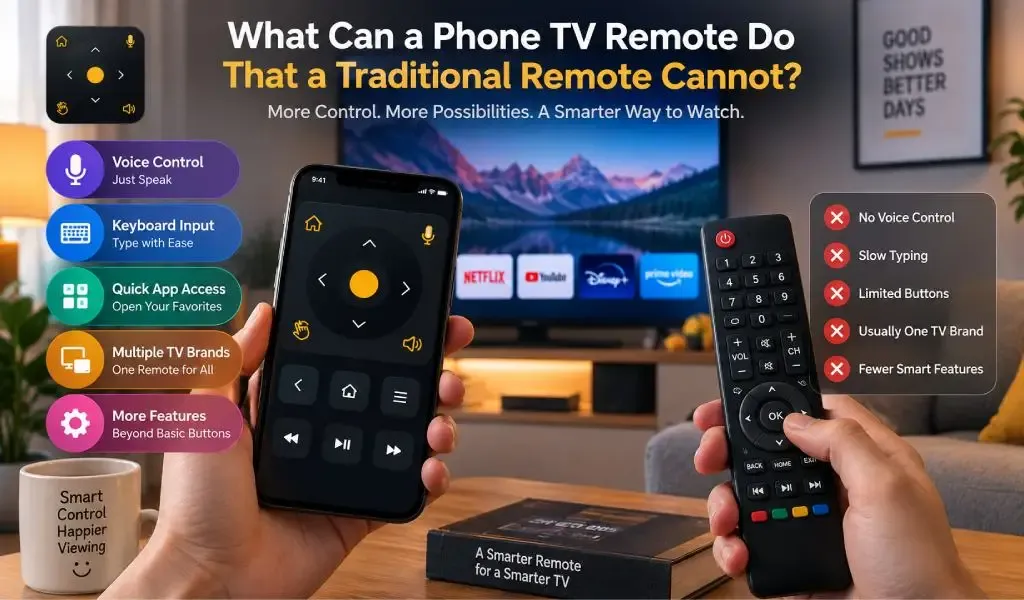
A phone TV remote can do much more than a traditional remote because it combines television controls with a smartphone's touchscreen, keyboard, microphone, connectivity and software. Instead of being limited to a fixed set of physical buttons, a phone based remote can provide D Pad navigation, text entry, voice control, quick access to TV functions and a more adaptable interface.
Traditional remotes are still useful. They are simple, familiar and ready to use without an app or phone battery. But modern smart TVs have evolved into software platforms, and controlling them can involve searching, entering text, opening applications, navigating menus and managing connected devices.
That is where a phone becomes more than a replacement remote.
A phone TV remote can provide features that physical remotes cannot
A phone TV remote can use capabilities already built into the smartphone, including a touchscreen, keyboard, microphone and software interface.
A traditional remote generally has a fixed button layout. A phone can change its interface depending on what you are doing.
For example, Google says its Google TV app can control media playback, change volume, turn compatible TVs on or off, activate Google Assistant and enter text for searches or login information.
Apple similarly provides an Apple TV Remote on iPhone and iPad with touch based navigation, text dictation and Siri interaction for compatible Apple TV devices.
The difference is therefore not simply physical versus digital. It is fixed controls versus a software based control interface that can adapt to different tasks.
Read also: Universal TV Remote Control Website vs Remote App: What Is the Difference?
A phone remote makes text entry much easier
A phone remote makes text entry easier because the smartphone already has a full keyboard.
Typing with a traditional TV remote can be slow. You usually have to move through letters one at a time using directional buttons before selecting each character.
A smartphone changes that experience.
When a smart TV asks you to search for a movie, enter an email address or type a password, the phone can provide a familiar keyboard instead of requiring individual button presses.
Google's official documentation specifically lists text entry for searches and login information as one of the capabilities of its Google TV remote.
Samsung also documents mobile TV control that allows users to search TV content using the phone's keyboard.
This becomes especially valuable when using streaming applications, because searching is often one of the most common things people do after turning on a smart TV.
A phone remote can use voice control instead of requiring every command to be typed
A phone remote can use the smartphone microphone to provide voice based interaction on supported TVs and remote systems.
Traditional remotes can include microphones, but a phone already has a microphone and the software needed to process voice commands through supported services.
Google's TV remote supports Google Assistant, while Apple allows Siri interaction and dictation for supported Apple TV functions.
This can make certain tasks faster.
Instead of navigating through menus to find a particular search function, users may be able to speak a supported command or dictate a search term.
The exact capabilities depend on the TV platform, remote app and available voice service, so voice control should not be treated as identical across every television.
A phone remote can replace a large number of dedicated buttons with a touchscreen
A phone remote can display controls when they are needed instead of permanently placing every possible function on the device.
Traditional remotes have to balance simplicity with the number of physical buttons available. A phone can use different screens, menus and layouts for different functions.
This is particularly useful with smart TVs because the available controls can extend beyond volume and channels.
For example, a mobile remote can provide navigation controls, home access, back buttons, application controls, playback controls and other functions depending on the TV.
Samsung's current SmartThings documentation shows that supported mobile remotes can provide controls for volume, channels, Home, Back, Guide, settings and apps.
The interface can therefore become more closely connected to the TV's software rather than being limited to a fixed physical button arrangement.
A phone remote can provide D Pad navigation without a separate physical controller
A phone remote can provide D Pad navigation through the touchscreen, making it easier to move around smart TV menus and applications.
The D Pad remains useful because many TV interfaces are designed around directional navigation.
With Universal TV Remote Control, D Pad navigation is part of the remote experience. Users can move through menus, select items and navigate supported TV interfaces directly from their phone.
The advantage is not that a touchscreen completely replaces physical directional buttons for everyone. Some users may actually prefer the tactile feedback of a traditional D Pad.
The advantage is flexibility.
A smartphone can combine directional navigation with other controls such as keyboard input, voice control and touch based interaction in one device.
A phone remote can give you one control device for different TV brands
A universal phone remote can be more convenient than maintaining separate remote applications or physical remotes when a household has TVs from different manufacturers.
A traditional remote is usually associated with one device or a particular ecosystem. A universal app can provide a broader interface across compatible television brands.
Universal TV Remote Control supports more than 700 TV brands and is available in more than 100 countries. It has also reached more than 130M+ downloads.
That broad compatibility matters when the televisions in a home are not all from the same manufacturer.
You could have a Samsung TV in one room, an LG TV in another and a TCL, Hisense, Roku or Android TV setup elsewhere. A universal remote app gives users the possibility of using one familiar smartphone based solution across compatible devices.
The controls will not necessarily be identical on every television. Different manufacturers and models expose different functions. The benefit is the breadth of compatibility rather than a claim that every TV behaves exactly the same way.
A phone remote can provide faster access to smart TV functions
A phone remote can bring commonly used TV controls together in a software interface instead of requiring users to locate a physical remote every time.
Modern phones are often already in the user's hand. That makes them convenient when the physical remote is misplaced, out of reach or unavailable.
Samsung's current SmartThings mobile remote is designed to let users control supported TVs from their phones, including volume, channels and other TV functions. Samsung also supports quick access to the mobile remote on certain devices.
This is one of the practical differences between a phone and a traditional remote.
The phone is not another device that you need to remember where you placed. It is usually the device you already carry.
A phone remote can combine remote control with other smart home functions
A phone remote can become part of a larger smart home ecosystem instead of functioning as an isolated controller.
Samsung, for example, integrates TV control into SmartThings, where the phone can also interact with other connected devices. Samsung describes SmartThings as a platform that can turn a phone into a personal remote for connected devices.
This creates possibilities that a traditional TV remote generally cannot provide.
The same smartphone can control a television, interact with smart home devices, access streaming services, manage accounts and perform many other tasks.
A traditional remote is deliberately focused on television control. A smartphone is a general purpose computing device that can also become a remote.
A phone remote can make searching and browsing easier
A phone remote can improve the experience of searching for content because it combines navigation, typing and voice input.
Smart TV interfaces increasingly depend on search. Streaming services contain large libraries, and finding something often requires entering several words.
A traditional remote can handle this, but the process may involve repeated directional button presses.
A phone provides a faster path through keyboard input and, where supported, voice input.
Apple's remote interface supports dictation for supported text fields, while Google's remote supports text entry for searches and login information.
This is one of the clearest areas where a smartphone can provide a better interface than a conventional remote.
A phone remote can be updated without replacing the hardware
A phone remote can evolve through software updates, while the physical layout of a traditional remote is fixed when the hardware is manufactured.
If a remote app adds a new control, changes its interface or improves compatibility, the user may receive that change through an application update.
A physical remote cannot normally gain a new button or redesigned interface without replacing the device.
This does not mean every app update improves every TV. Compatibility remains dependent on the television platform and the communication methods available.
The advantage is that software can evolve without requiring a new physical controller.
A phone remote can be more useful when the original remote is missing
A phone remote can provide an immediate alternative when the original remote has been lost, damaged or misplaced, provided the TV supports the required control method.
Samsung officially describes using SmartThings to turn a phone into a TV remote, while Google and Apple provide their own phone based remote options for compatible TV platforms.
This is where universal remote apps can have a practical advantage.
Instead of searching for a replacement physical remote for a particular TV model, users can check whether their TV is supported by a compatible universal remote app.
Universal TV Remote Control is designed around this broader use case, with support for more than 700 TV brands.
A phone remote can be more flexible, but a traditional remote still has advantages
A phone remote is not automatically better for every user because a traditional remote has several advantages of its own.
A physical remote does not depend on your phone battery. It does not require you to unlock your phone, open an app or deal with notifications. Physical buttons also provide tactile feedback, which some people find easier when controlling a TV without looking at the remote.
A phone remote introduces another layer between the user and TV. The phone operating system, app, network connection and TV compatibility can all affect the experience.
The strongest argument for a phone remote is therefore not that traditional remotes are obsolete. It is that smartphones can provide a much broader control interface when the TV and app support it.
Universal TV Remote Control combines smartphone features with broad TV compatibility
Universal TV Remote Control is designed to provide the flexibility of smartphone based control while supporting a broad range of television brands.
The app supports more than 700 TV brands and has more than 130M+ downloads across more than 100 countries.
Its feature set includes D Pad navigation, voice control and keyboard support, giving users several ways to interact with compatible TVs.
The D Pad is useful for navigating menus. Voice control can make supported interactions faster. Keyboard support makes text entry more practical when searching or entering information.
The user friendly interface is also important because the purpose of a remote is to make TV control easier, not to introduce unnecessary complexity.
Strong customer support provides another practical benefit when users have questions about compatibility, setup or a specific TV environment.
This broader approach makes the app particularly relevant for households that use more than one TV brand or want more functionality than a basic physical remote provides.
You may like reading: Universal TV Remote Control App Security: Can Someone Hack Your TV?
A phone TV remote is most useful when you need more than basic buttons
A phone TV remote can do things a traditional remote cannot because the smartphone is not limited to a fixed set of physical controls.
It can provide a keyboard for faster text entry, a microphone for supported voice commands, a touchscreen for flexible navigation, software updates for an evolving interface and access to broader smart home functionality.
It can also provide one remote experience across compatible TVs from different brands when a universal application supports those devices.
Traditional remotes still win in simplicity and tactile control. They are excellent when all you need is power, volume, channels and navigation.
But once the TV becomes a platform for streaming applications, search, accounts and connected services, the smartphone starts to make more sense as a remote.
Universal TV Remote Control takes that approach further by supporting more than 700 TV brands, D Pad navigation, voice control, keyboard support and a user friendly interface.
The biggest difference is therefore not simply that a phone replaces a remote.
A phone can turn the remote into software, giving it the ability to evolve, adapt and use capabilities that a fixed physical controller does not have.
Frequently Asked Questions
What can a phone TV remote do that a traditional remote cannot?
A phone TV remote can provide features such as keyboard input, voice control, touchscreen navigation, software updates and integration with other smart devices. The exact features depend on the TV and remote app.
Can I type on my TV using my phone?
Yes, supported TV remote systems can use the phone keyboard or dictation for text entry. Google and Apple both document phone based text entry for supported TV platforms.
Can a phone remote control multiple TV brands?
Yes, a universal remote app can support multiple TV brands from one phone. Universal TV Remote Control supports more than 700 TV brands, although available controls can vary between TV models.
Is a phone TV remote better than a physical remote?
A phone remote is more flexible for features such as typing, voice control and smart TV navigation, while a physical remote is simpler and provides dedicated tactile buttons. The better option depends on how you use your TV.
Does Universal TV Remote Control support keyboard and voice control?
Yes, Universal TV Remote Control provides keyboard support and voice control alongside D Pad navigation. These features make the smartphone useful for both traditional remote functions and smart TV tasks such as navigation and text entry.