
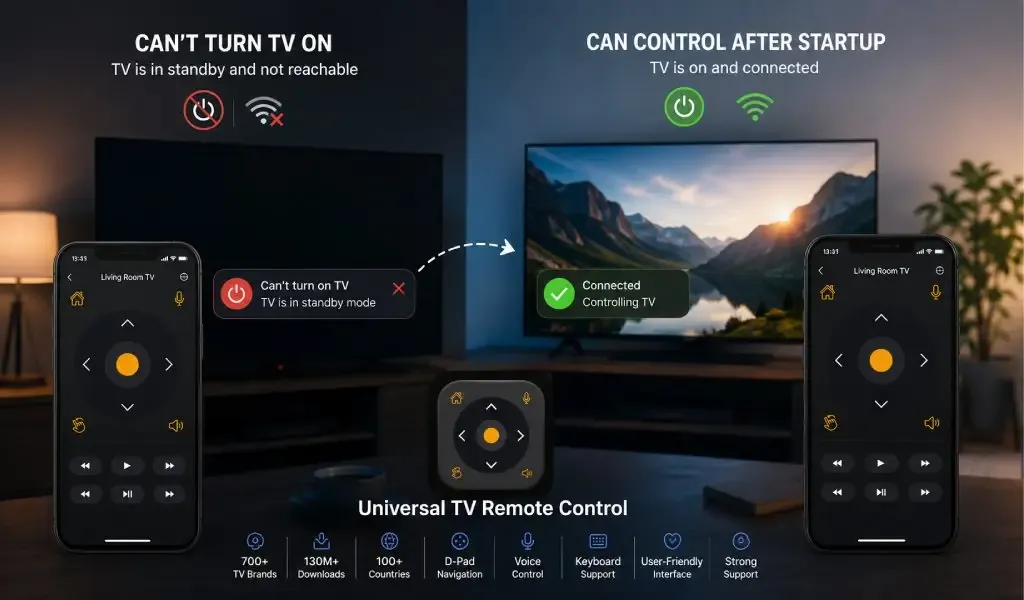
A TV remote app can control your television after startup but fail to turn it on because the TV is not always fully reachable when it appears to be off. Once the television has started and its network services are active, a phone can often communicate with it normally. Before startup, however, the TV may be in standby, deep sleep, or a fully powered down state where its network hardware cannot receive remote commands.
That difference explains one of the most confusing experiences with smart TV remote apps.
You press the power button in the app and nothing happens. You turn the TV on using the physical remote or the button on the television itself. Suddenly, the phone app works perfectly. Navigation responds, the keyboard appears, voice features work, and other controls behave normally.
The app may not be broken at all.
The real issue is often the difference between controlling an active TV and waking a TV that is asleep or powered down.
Best Universal TV Remote App in 2026 - Features Comparison Guide
A TV must remain reachable in standby before a phone app can turn it on
A network based remote app can only turn on a TV if some part of the television remains awake enough to receive the command.
When a smart TV is running, several systems may be active:
WiFi or Ethernet networking
The TV operating system
Remote control services
Device discovery
Authorization and pairing services
The television can receive a command from a phone and respond almost immediately.
When the TV is turned off, the situation changes.
Some televisions enter a light standby state. Their screens are off, but selected components remain active. Other models enter a deeper power saving state that disables most network functionality. If the network interface is no longer listening for commands, a phone app has nothing to communicate with.
This is why the same remote app can appear to have two completely different levels of functionality depending on whether the TV is already running.
The important distinction is simple:
Controlling an awake TV and waking an inactive TV are separate technical capabilities.
A TV remote app cannot wake a device that has completely shut down its network connection
If a TV's network hardware is inactive, a WiFi remote command cannot reach the television.
This is the fundamental limitation behind many mobile remote experiences.
A phone app communicates with a smart TV through a network connection. That connection requires the TV to maintain enough power for its networking hardware and remote control service.
If the TV enters a deeper sleep state, disconnects from WiFi, or shuts down its network interface to save energy, the phone cannot simply send a command through the air and force it back online.
This is also why internet access on your phone is not the deciding factor.
Your phone can be connected to a fast WiFi network.
Your TV can normally be connected to the same router.
The remote app can work perfectly when the TV is running.
Yet the app can still fail to power the TV on because the television is no longer actively listening.
That limitation is usually determined by the TV's hardware, operating system, standby settings, and supported control protocols rather than the remote app alone.
Standby mode determines whether network based power on is possible
A TV in standby is not necessarily fully turned off.
Modern televisions can use different power states depending on their manufacturer and settings.
A light standby state can keep remote services available
Some televisions maintain limited power for features such as network connectivity, software updates, voice activation, and faster startup.
When this happens, a mobile remote app may still be able to contact the TV.
The screen is off, but selected internal systems remain available.
This is the ideal situation for network based power control.
A deep sleep state can stop a remote app from reaching the TV
Other power saving modes reduce energy consumption more aggressively.
The TV may disable WiFi, suspend network services, or stop listening for local control commands.
From the phone's perspective, the television can effectively disappear.
The app cannot send a successful power command because the destination device is no longer reachable.
This is why power saving features can sometimes create an apparent contradiction. A TV can be technically smart and connected when active while being intentionally unreachable when inactive.
The tradeoff is straightforward.
Lower standby power consumption can mean fewer features remain available while the TV is off.
Read Also: Can We Use a Hotspot to Connect the Universal TV Remote Control App?
Wake on network features can allow some TVs to receive a power command
Some television platforms support features that allow a device to wake from a low power state through a network signal.
The exact name varies by manufacturer.
You may encounter terms such as:
Wake on LAN
Network standby
Remote start
Mobile TV On
Power on with mobile
Quick start
Always ready
The basic principle is similar. The TV leaves enough hardware active to detect an incoming wake request.
However, support varies significantly.
One TV may support wake functionality over Ethernet but not WiFi. Another may require a specific setting. A third may support power on only through the manufacturer's official ecosystem.
That is why there is no universal rule stating that every phone remote can turn on every smart TV.
Even official apps are limited by what the television itself supports.
Samsung, for example, documents SmartThings based TV control and notes that compatible TVs can be controlled from the app, including power functions, once the TV is properly connected and configured. Compatibility and setup requirements still apply.
A remote app can control an active TV because the communication service is already running
Once the television has started, the technical challenge becomes much easier.
The network interface is active.
The operating system is running.
The TV can advertise or respond to remote control services.
The pairing session can be recognized.
The phone can send commands.
This is why users often see navigation work even though power on does not.
The D Pad is sending commands to a television that is already awake.
The keyboard can send text because the TV operating system is running.
Voice related controls can work because the relevant software services are available.
The app does not need to wake the entire device first.
Google's own phone remote functionality illustrates this active device relationship. The Google TV app can pair with and control compatible Google TV and Android TV devices over the local network, including navigation, volume, text entry, and supported power functions.
The availability of individual controls still depends on the television and its current state.
Infrared can solve the power problem because it works differently from WiFi
Infrared control is fundamentally different from network based control.
A traditional infrared remote sends a light based signal directly to a sensor on the television.
The TV does not need to be connected to WiFi.
It does not need to maintain a network service.
It does not need to remain visible on the local network.
The infrared receiver can remain available in standby and detect the correct power command.
That is why a phone with a compatible IR blaster can sometimes turn on a TV that a WiFi remote app cannot wake.
The limitation is hardware.
Not every smartphone includes an IR blaster, and not every TV control situation can rely on infrared.
For older televisions and supported Android phones, however, IR remains a practical advantage because the power command does not depend on the TV's network stack being active.
You may like reading: IR Blaster vs WiFi TV Remote App - Which One Do You Actually Need?
HDMI CEC can turn the TV on through another device that remains awake
Some remote systems solve the power problem indirectly through HDMI CEC.
HDMI CEC allows compatible devices connected through HDMI to exchange certain control commands.
For example, a streaming device that remains powered can sometimes wake the television through the HDMI connection.
Roku documents this behavior clearly. With compatible settings enabled, the Roku mobile app can send TV power commands through the Roku player using HDMI CEC rather than infrared. Roku also notes that powering on the TV through this setup depends on the player remaining powered and the TV supporting the required CEC behavior.
This is an important distinction.
The phone is not necessarily waking the TV directly.
Instead, the phone communicates with the streaming device, and the streaming device communicates with the TV through HDMI CEC.
That is one reason power behavior can vary depending on the equipment connected to the television.
A TV remote app may appear more capable in one home simply because a connected streaming device is helping manage power control.
USB powered streaming devices can lose the ability to wake the TV
A connected streaming device must remain powered before it can send a wake command.
This creates an interesting limitation with devices powered from a TV's USB port.
If the TV turns off and stops supplying power through USB, the streaming device can shut down too.
Now both devices are unavailable.
Roku specifically notes that a USB powered streaming player can power off with the television, which means it must boot again when the TV is turned back on. Roku recommends keeping a player powered from a wall outlet when continuous availability is needed for power related control features.
The broader lesson applies beyond Roku.
A device cannot wake another device if the device sending the wake command has also lost power.
A power button in an app does not guarantee that every TV supports power on
A remote app can include a power button without being able to turn on every compatible TV.
The button is an available command.
Whether the television responds depends on several factors:
- The TV model
- The TV operating system
- The current standby state
- Network wake support
- WiFi or Ethernet behavior
- HDMI CEC availability
- Infrared hardware support
- Manufacturer restrictions
This is where users should be careful when comparing remote apps.
A claim that an app includes a power button is not the same as proof that every television can be awakened from every power state.
Roku's own documentation demonstrates how device specific these limitations can be. Some TV controls depend on HDMI CEC, some depend on the type of Roku device, and some features are unavailable on certain hardware configurations.
The same principle applies across the wider smart TV market.
Universal TV Remote Control App offers a broader approach because TV control methods are not identical
A single brand remote app can make sense for a household built around one television ecosystem.
The limitation appears when the household changes.
One room may have a Samsung TV. Another may use LG webOS. A third television may be older and better suited to infrared control.
That is where a broader compatibility approach becomes more useful.
Universal TV Remote Control supports more than 700 TV brands, has achieved 130M+ downloads, and is available in 100+ countries. Those numbers matter because broad compatibility requires supporting a wide range of television platforms rather than assuming every TV handles remote communication in the same way.
The app also provides practical controls including D Pad navigation, voice control, and keyboard support.
These features are particularly useful after startup, when modern smart TV use involves much more than changing channels. Users search streaming apps, enter passwords, navigate menus, and move through app interfaces.
The user friendly interface and customer support are also important for a universal solution because the correct control method can vary by TV model and platform.
The balanced reality is that no universal app can override a television's hardware power limitations.
If a TV does not support network wake and the phone does not have compatible infrared hardware, an app cannot create a communication path that does not exist.
A broader remote solution is therefore more future ready not because every TV behaves identically, but because it can serve more of the different technologies found in real households.
The best way to diagnose the problem is to separate startup from control
If your remote app works after the TV is manually turned on, test the issue as a power state limitation rather than a general connection failure.
Ask these questions:
Does the app work immediately after the TV starts?
If yes, the normal remote connection is probably functioning.
Does the TV remain visible on the network when the screen is off?
If not, the TV may be entering a deeper standby state.
Does the TV have a network wake or mobile power setting?
If yes, enabling the appropriate feature may allow supported remote power commands.
Does your phone have an IR blaster?
If it does, infrared may provide an alternative for compatible TVs.
Is a streaming device connected through HDMI CEC?
That device may be able to wake the television indirectly.
Separating these questions prevents unnecessary troubleshooting.
You may not have a broken remote app at all. You may simply be trying to contact a device that is intentionally asleep.
The real limitation is usually the TV's power state rather than the remote app
Some TV remote apps cannot turn on a television but can control it immediately after startup because a powered down TV is not always available to receive a network command.
Once the TV is awake, its operating system and network services become available, making normal remote control possible.
Network standby can solve the problem on supported models.
Infrared can bypass the network requirement on compatible phones and TVs.
HDMI CEC can allow a powered streaming device to wake the television indirectly.
But none of these methods works universally across every TV and every power state.
That is why broad compatibility matters. Universal TV Remote Control is designed for households with different TV brands and control technologies, supporting more than 700 TV brands alongside D Pad navigation, voice control, keyboard support, and a straightforward interface.
For users, the most useful takeaway is simple:
If your TV remote app works after startup but cannot turn the TV on, the app may be functioning correctly. The missing capability is often the TV's ability to receive a command while it is asleep.
FAQs
Can a phone remote app turn on every smart TV?
No, a phone remote app cannot turn on every smart TV because power on capability depends on the TV's standby mode, network wake support, infrared compatibility, or connected devices that can use HDMI CEC.
Why does my TV remote app work only after I turn the TV on manually?
Your remote app works after manual startup because the TV's operating system and network services become active once the television is running. Before startup, the TV may not be listening for WiFi remote commands.
Can infrared turn on a TV when WiFi control cannot?
Yes, infrared can turn on a compatible TV even when WiFi control cannot because IR sends a direct signal to the TV's infrared receiver and does not require the TV's network connection to remain active.
Does HDMI CEC help a mobile remote app turn on a TV?
Yes, HDMI CEC can help when a compatible streaming device remains powered and can receive commands from the mobile app. The streaming device can then send a power related command to the TV through the HDMI connection.
Why can I turn my TV off from an app but not turn it back on?
You may be able to turn the TV off because the network connection is active while the TV is running. After shutdown, the television may disable the network hardware needed to receive the command to turn back on.