
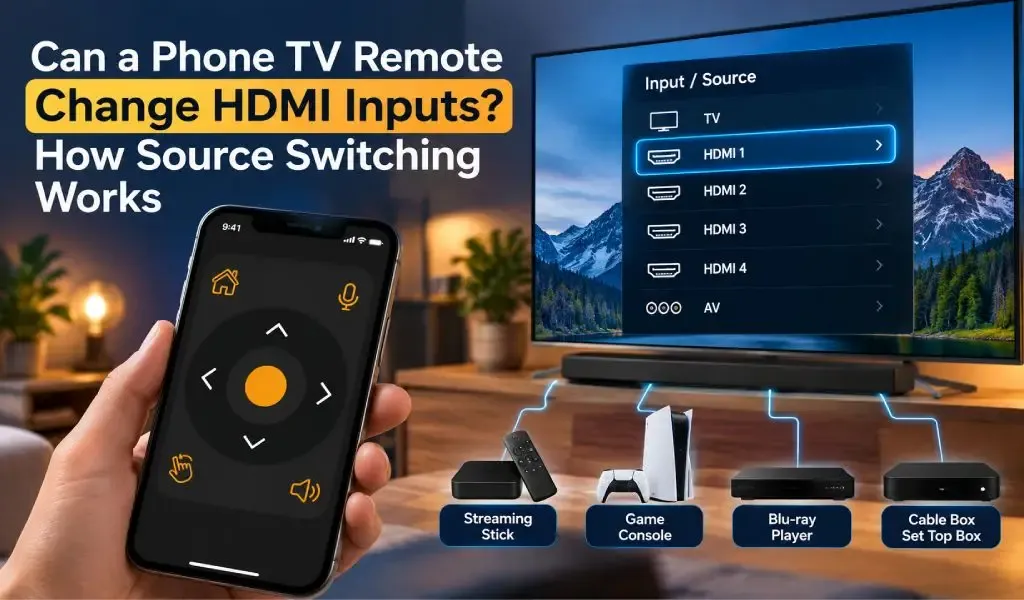
Yes, a phone can change HDMI inputs on a compatible smart TV when the remote app supports input control. Instead of reaching for the physical remote and pressing Source or Input, you can select the TV’s HDMI connection directly from your phone.
This is useful when your TV has several connected devices, such as a PlayStation, Xbox, Fire TV Stick, Chromecast, Blu ray player, soundbar, or cable box. The important detail is that changing an HDMI input is a TV control function, not the same thing as controlling the device connected to that input.
The Universal TV Remote Control app includes an Input function for compatible Smart TVs, alongside power, volume, channel, navigation, voice search, keyboard and other controls. Its current Google Play listing also states that Smart TV control requires the phone and TV to be connected to the same WiFi network. Google Play
What Does Changing an HDMI Input Actually Do?
Changing an HDMI input tells the TV which connected HDMI port should provide the picture and sound.
For example, imagine your TV has:
- HDMI 1 connected to a PlayStation
- HDMI 2 connected to a streaming stick
- HDMI 3 connected to a sound system or another device
- HDMI 4 connected to an Xbox
When you change the TV from HDMI 1 to HDMI 4, the TV stops displaying the signal from HDMI 1 and displays the signal coming from HDMI 4 instead.
The connected devices themselves do not necessarily change. You are simply telling the TV which source to display.
This distinction matters because a phone remote may be able to switch the TV to HDMI 2 but still require the appropriate controls for the streaming device connected to HDMI 2.
Modern TVs commonly expose several source options through their input menus. For example, Sony documents TV input options including HDMI 1, HDMI 2, HDMI 3, HDMI 4, AV, USB and other sources. Sony
Can a Phone Remote Change From HDMI 1 to HDMI 2?
Yes, a phone remote can change between HDMI sources when the TV and remote app support input control.
In a compatible setup, the process is essentially:
- Connect your phone and TV using the method required by the remote app.
- Open the remote interface.
- Select the Input, Source, or similar control.
- Choose the required HDMI connection.
- The TV switches to that source.
The exact interface can differ between TV brands and models because manufacturers expose different controls through their network or remote control systems.
The Universal TV Remote Control app currently lists Input among its Smart TV functions, meaning source selection is part of the available control set for supported Smart TVs. Google Play
If your TV does not show an Input button in the app, that does not necessarily mean HDMI switching is impossible. The available controls can depend on the TV model, operating system and connection method.
For more information about why remote controls can behave differently between television models, see why TV remote apps have different buttons for different TVs.
Why Does HDMI Source Switching Sometimes Depend on HDMI CEC?
HDMI CEC can allow connected HDMI devices and the TV to communicate, which can affect automatic source switching.
CEC stands for Consumer Electronics Control. It is a feature built into HDMI that allows compatible devices to send control commands through an HDMI connection.
Different manufacturers use different names for the feature. Samsung calls it Anynet+, LG uses SIMPLINK, Sony uses BRAVIA Sync, and other manufacturers have their own names. Google also documents CEC as a way for HDMI devices to be controlled through one remote and notes that compatible devices can trigger an automatic switch to their HDMI input. Google Help
For example, if a streaming device connected to HDMI 2 wakes up, HDMI CEC may tell the TV to switch to HDMI 2 automatically.
That is different from manually selecting HDMI 2 from a phone remote.
HDMI Input Switching and HDMI CEC Are Not the Same Thing
HDMI input switching and HDMI CEC perform related but different jobs.
Input switching tells the TV which source to display.
HDMI CEC allows compatible HDMI devices to communicate control commands with the TV and with each other.
You can therefore have a TV where you manually switch from HDMI 1 to HDMI 2 without relying on automatic CEC behavior.
CEC can also create situations where the TV changes inputs unexpectedly. Samsung documents cases where connected HDMI devices can cause the TV to switch sources automatically through Anynet+.
LG similarly documents SIMPLINK as its HDMI CEC feature and provides settings for enabling it on compatible TVs. LG
What Can You Do After Switching to an HDMI Device?
After switching HDMI inputs, the phone remote may continue controlling the TV, while control of the connected device depends on the TV and device integration.
For example, switching to a game console input does not automatically turn your phone into a complete PlayStation or Xbox controller. The TV remote may still handle functions such as navigation, volume or other supported TV controls, while the console needs its own controller.
The same principle applies to streaming devices.
A TV remote may let you switch to the HDMI port containing a streaming device, while the streaming device itself may require compatible navigation controls.
This is one reason it is important to distinguish source selection from device control.
Samsung's documentation, for example, explains that HDMI connected devices can be controlled through its universal remote system when the appropriate setup and HDMI CEC functionality are available. Samsung Support
Can You Switch to a Gaming Console From Your Phone?
Yes, you can switch the TV to a gaming console's HDMI connection if your TV and remote app expose input control.
Suppose your PlayStation is connected to HDMI 2. You can select HDMI 2 through the TV's input menu instead of using the physical remote.
However, switching the TV to HDMI 2 does not replace the game controller. Your phone remote is controlling the TV's source selection, not necessarily the console's gameplay.
HDMI CEC can add another layer of convenience. Compatible consoles and TVs can communicate over HDMI, allowing certain power and source switching functions to happen automatically. Samsung documents this type of integration for gaming consoles connected directly to its TVs.
Can a Phone Remote Switch to a Streaming Stick or Set Top Box?
Yes, a phone remote can switch the TV to the HDMI port used by a streaming stick or set top box when input control is supported.
For example:
HDMI 1: Cable box
HDMI 2: Fire TV Stick
HDMI 3: Game console
HDMI 4: Blu ray player
If the TV is currently displaying HDMI 1, selecting HDMI 3 through the phone remote tells the TV to display the game console's signal.
Some HDMI devices can also trigger automatic source changes through CEC. Google explains that a CEC compatible streaming device can cause a TV to switch automatically to the HDMI port where that device is connected. Google Help
This is particularly useful when several devices are connected and you frequently move between them.
Why Does My Phone Remote Not Show HDMI Inputs?
The most common reason is that the TV model or remote connection does not expose source selection to the app.
A universal remote app does not necessarily receive an identical set of controls from every TV. A Samsung TV, Roku TV, LG TV and Android TV can expose different functions, even when all are described as Smart TVs.
Other possible reasons include:
- The TV model has limited remote functionality over its network connection.
- The app has connected to a different remote interface than expected.
- The TV has not been fully paired with the phone.
- The phone and TV are not connected to the same WiFi network.
- The TV's software needs an update.
- The Input control is located under another section of the remote interface.
- The connected device or HDMI port is not being detected correctly.
- The TV uses a different source management system.
If your app cannot find the TV at all, the problem is different from missing input controls. In that situation, our guide on why a TV remote app says no TV found covers discovery and connection problems.
Does HDMI Switching Work Over WiFi?
Yes, Smart TV remote apps can send supported input commands over the local WiFi connection when the TV supports network based remote control.
The phone does not send an HDMI signal to the TV. Instead, the app communicates with the TV over the network and tells the TV which source to select.
The HDMI cables still carry the actual video and audio signals from the connected devices.
This means there are two separate communication paths:
Phone → WiFi → TV: remote control command
Device → HDMI → TV: video and audio signal
The Universal TV Remote Control app uses the local network for Smart TV control and requires the phone and compatible TV or device to be connected to the same WiFi network. Google Play
That is also why problems with local network discovery can affect remote apps even when your internet connection itself is working normally.
You can learn more about this in our guide to mDNS and Smart TV remote app discovery.
Does HDMI Switching Work With an IR Phone Remote?
Yes, HDMI or source switching can also work through infrared when the phone has an IR blaster and the remote profile includes the appropriate source controls.
IR works differently from WiFi control.
With IR, the phone sends an infrared command directly toward the TV, similar to a traditional remote. It does not need the TV to be connected to your home WiFi network.
The limitation is that the phone needs compatible infrared hardware. The Universal TV Remote Control app supports traditional IR TVs when the phone has a built in IR blaster. Its listed IR controls include an AV/TV function alongside power, volume, channel, numeric and menu controls.
For Smart TVs, the app instead uses network based control.
This distinction is important if you are trying to use a phone remote with an older television.
Why Does the TV Sometimes Switch HDMI Inputs by Itself?
The TV can switch inputs automatically when HDMI CEC or another automatic source detection feature is enabled.
For example, turning on a compatible HDMI connected device can send a CEC signal telling the TV to select that device's input.
Samsung documents this behavior with Anynet+, where connected HDMI devices can signal the TV to change sources. Sony similarly documents automatic input changes through BRAVIA Sync on supported systems.
If the TV repeatedly jumps to another HDMI source, check:
- Whether HDMI CEC is enabled.
- Which devices are connected to each HDMI port.
- Whether one connected device is waking up automatically.
- Whether the TV and connected devices have current software.
- Whether a particular HDMI device is sending unwanted CEC commands.
Turning CEC off can stop automatic source switching on some TVs, but it can also disable useful features such as automatic power and device control.
Can One Phone Remote Control Different HDMI Sources?
Yes, one phone remote can switch between multiple HDMI sources as long as the TV exposes those inputs through the supported remote control system.
The phone is still controlling one television. It is simply selecting different source ports on that TV.
For example, you could use the same remote interface to move from:
HDMI 1 → cable box
to:
HDMI 2 → game console
and then:
HDMI 3 → streaming device
The Universal TV Remote Control app is designed to work across a broad range of compatible television brands and supports multiple compatible TVs from one smartphone. Its current site states support for more than 700 TV brands, while its Google Play listing reports more than 130 million users and availability across more than 100 countries.
The important qualification is that universal does not mean every TV exposes exactly the same buttons. Available controls can vary according to the television model and connection method.
Is a Phone Better Than a Physical Remote for HDMI Switching?
A phone can make HDMI switching more convenient when you already use your smartphone as your TV remote, especially when the physical remote is missing or you frequently switch between several connected devices.
A physical remote can still be faster for someone who already knows exactly where the Source button is.
The main advantage of a phone based remote is that it combines source selection with other controls in one device. Depending on the TV and app, that can include D Pad navigation, keyboard input, voice search, volume control, channel control and app navigation.
That broader functionality is particularly useful on Smart TVs where you frequently type searches or navigate on screen menus.
For a deeper comparison of phone based and traditional remotes, see what a phone TV remote can do that a traditional remote cannot.
What Should You Check Before Using a Phone to Change HDMI Inputs?
Check the TV model, connection method and available remote controls before assuming HDMI switching will work.
The quickest checklist is:
- Confirm that your TV is supported by the remote app.
- Check whether the app provides an Input or Source control.
- For Smart TVs, connect the phone and TV to the same WiFi network.
- For IR TVs, confirm that the phone has a built in IR blaster.
- Check whether HDMI CEC is enabled if you want automatic source switching.
- Make sure the HDMI device is connected to the port you expect.
- Update the TV software if source switching behaves unexpectedly.
If you are unsure whether your television is supported, start with this guide on how to know if your TV is compatible with a universal remote app.
Frequently Asked Questions
Can I change my TV from HDMI 1 to HDMI 2 with my phone?
Yes, a compatible phone remote app can change the TV from HDMI 1 to HDMI 2 when the TV exposes input control through the supported connection.
Does changing HDMI input change the connected device?
No, changing the HDMI input only tells the TV which source to display. The connected device remains connected to its HDMI port.
Does HDMI CEC have to be enabled for phone remote input switching?
No, manual input switching and HDMI CEC are separate functions. CEC can provide additional automatic source switching and device control, but a TV can also support manual source selection without relying on CEC.
Can Universal TV Remote Control change HDMI inputs?
Yes, the app currently lists Input as one of its Smart TV controls. Actual available input options depend on the supported TV model and connection method.
Can I switch HDMI inputs without WiFi?
Yes, if your phone has a compatible built in IR blaster and the TV remote profile supports source control. WiFi is required for the app's Smart TV network based control, while IR control uses infrared signals instead.