
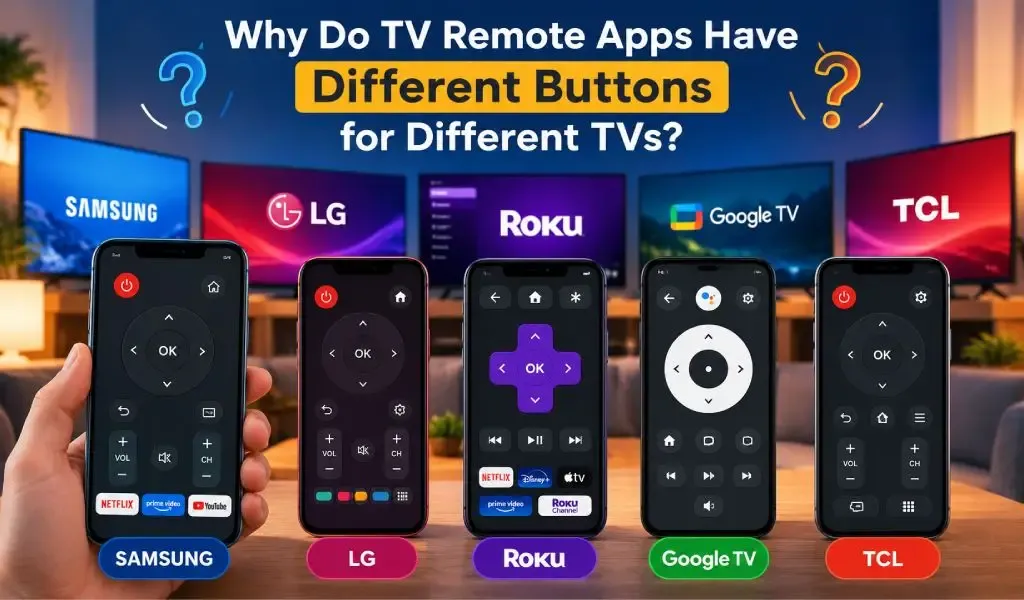
TV remote apps have different buttons for different TVs because manufacturers expose different controls, features, operating systems, and communication methods. A Samsung TV does not necessarily provide the same remote functions as an LG, Roku, Android TV, or Google TV, even when all of them are Smart TVs.
That is why a universal TV remote app may show an Input button for one television, a voice search button for another, and a different set of media or navigation controls for a third.
The word universal means the app can support a broad range of television brands and models. It does not mean every TV has exactly the same remote interface.
The Universal TV Remote Control app is designed around this model. It supports Smart TVs through WiFi and traditional TVs through an IR blaster when supported, with features such as power, volume, channels, keyboard, navigation, voice search, casting, and input control depending on the compatible TV.
Why do TV remote apps show different buttons?
TV remote apps show different buttons because each TV brand and model can support a different set of remote commands.
A physical remote already demonstrates this difference. A basic TV remote may have only power, volume, channel and navigation buttons, while a newer Smart TV remote may include dedicated buttons for streaming services, voice search, source selection, playback and other functions.
A phone based remote has the same basic limitation. The app cannot simply assume that every television understands every possible command.
Instead, the available controls can depend on factors such as:
- TV brand
- TV model
- Smart TV operating system
- Remote control protocol
- Network capabilities
- Supported TV features
- Connection method
- Available apps and services
- Whether the phone is using WiFi or infrared
This is why two TVs controlled from the same universal remote app can display different interfaces.
The difference does not necessarily indicate that something is wrong with the app. In many cases, it means the app is adapting its controls to the television.
Why does a universal remote not have the same buttons for every TV?
A universal remote does not have identical buttons for every TV because universal compatibility covers different control systems rather than one standardized set of commands.
Samsung uses Tizen on many Smart TVs, LG uses webOS, Roku uses Roku OS, while other televisions use Android TV or Google TV. These platforms can expose different capabilities to remote control applications.
The current Universal TV Remote Control listing identifies support across a wide range of brands and platforms, including Samsung, LG, Sony, Philips, TCL, Hisense, Panasonic, Sharp, Toshiba, Xiaomi, OnePlus, Skyworth and Vizio, as well as Android TV, Google TV, Roku TV, webOS and Tizen based televisions. Google Play
A universal app therefore has to account for differences instead of presenting exactly the same interface to every television.
This is also why compatibility should be considered at the model and platform level, not just by looking at the TV brand.
For more information, see how to know if your TV is compatible with a universal remote app.
Why do Samsung, LG, Roku, and Android TV remotes look different?
Samsung, LG, Roku, and Android TV remotes look different because their operating systems and supported functions are different.
A Samsung Smart TV may provide controls associated with Tizen, while an LG television may expose webOS specific functionality. Roku TVs have their own navigation and channel environment, while Android TV and Google TV use Google's platform and services.
The difference becomes more noticeable when using a phone because the app can adapt the interface to the functions available from the connected television.
For example, one TV might expose:
- Home
- Back
- Menu
- Input
- Volume
- Channel
- D Pad
- Media controls
Another might provide additional controls for:
- Voice search
- App launching
- Keyboard input
- Touchpad navigation
- Casting
- Streaming applications
The available functionality is ultimately determined by what the television and its software support.
Why is the Input button missing on some TVs?
The Input button can be missing because the connected TV does not expose source selection through the particular remote control interface being used.
Input or Source is a good example of why universal remote apps cannot use an identical layout for every television.
Some TVs allow an app to directly request a source change. Others may require a different command or expose source selection through a menu rather than a dedicated remote command.
The Universal TV Remote Control app currently lists Input among its Smart TV functions, but the controls available to a particular TV can depend on the supported model and connection method.
So if you connect the app to one television and see Input but do not see it on another, that does not automatically mean the second TV is unsupported.
It may simply expose a different set of remote functions.
You can also read our guide on changing HDMI inputs with a phone TV remote to understand how source switching works.
Why do some TV remote apps show voice control while others do not?
Voice control depends on whether the television and its remote protocol support voice commands.
A smartphone already has a microphone, so a remote app can use it as an input method when the connected TV supports compatible voice functionality.
However, simply having a microphone on the phone does not guarantee that voice commands can be sent to every TV.
Google TV and Android TV, for example, can provide voice search capabilities that are different from those available on other television platforms.
The Universal TV Remote Control app lists Voice Search among its Smart TV features, but supported functions depend on the connected TV.
This is one reason a voice icon may appear on one remote interface but not another.
Why do some TVs have a keyboard button while others do not?
Keyboard support depends on whether the television accepts text input through the supported remote connection.
Typing is especially useful on Smart TVs because entering search terms with a physical remote can be slow. A phone keyboard can make this process much easier when the TV supports text input.
A compatible remote app can use the smartphone keyboard to send text to supported television interfaces.
The Universal TV Remote Control app lists an easy keyboard as one of its Smart TV features, along with mouse navigation.
But keyboard functionality should not be treated as identical across every TV. A television may support basic navigation while offering limited text input, or it may use a different text entry system.
This is why the keyboard may appear only when the connected TV supports the relevant function.
Why do some TV remote apps have a D Pad while others use a touchpad?
D Pad and touchpad controls serve different navigation systems, and a TV may support one, both, or neither through a particular remote interface.
A D Pad provides directional controls such as:
Up → Down → Left → Right → OK
It is useful for navigating menus, settings, apps and lists.
A touchpad allows the user to swipe or move a pointer instead. This can be more convenient on televisions that support pointer based navigation.
The Universal TV Remote Control app lists mouse navigation and an easy keyboard among its Smart TV functionality, while its remote controls can vary according to the connected television.
The important point is that a phone remote does not have to reproduce every physical remote in exactly the same way. It can provide a digital interface suited to the capabilities of the connected TV.
Why do some TVs show app controls while others do not?
App controls depend on the TV platform and the applications exposed through its software.
Modern Smart TVs can have dedicated applications for streaming, music, news and other services. A remote application may be able to interact with some of these functions when the television makes them available through its supported control system.
The Universal TV Remote Control app lists App Control for Smart TVs and allows interaction with installed TV applications on supported devices.
However, this does not mean that every television has the same collection of apps or supports identical app commands.
For example, a Roku TV and a Samsung Tizen TV can both have Netflix, but their operating systems manage the application differently.
The remote app therefore has to account for the platform rather than treating Netflix control as a universal command that works identically everywhere.
Why do older TVs have fewer remote app buttons?
Older TVs often have fewer remote app buttons because they have fewer software based features and may rely on infrared rather than network control.
A traditional television may need only:
- Power
- Volume
- Channel
- Number buttons
- Menu
- Input
- Navigation
A modern Smart TV can require additional controls for:
- Streaming apps
- Voice search
- Keyboard input
- Touch navigation
- Media playback
- Casting
- Smart TV menus
The connection method also matters.
For traditional IR TVs, the phone needs a built in IR blaster for the app to send infrared signals. For compatible Smart TVs, the Universal TV Remote Control app uses the local WiFi network.
This creates another reason why the same application can display a different interface depending on the TV.
Why does the connection method affect the available buttons?
The connection method affects available buttons because WiFi and infrared do not communicate with the television in the same way.
With a compatible Smart TV, the phone and TV communicate through the local network. The app can use commands supported by the television's network remote interface.
With an IR television, the phone sends infrared signals that imitate commands from a conventional remote. The phone must have compatible IR hardware.
The Universal TV Remote Control app supports both approaches, with Smart TVs requiring the phone and TV to be connected to the same network and traditional IR TVs requiring a built in IR feature on the phone.
That difference alone can explain why one TV shows Smart TV features while another presents a simpler infrared remote.
If your Smart TV cannot be discovered, the problem may be network related rather than related to missing buttons. Our guide on why a TV remote app says No TV Found covers the most common discovery issues.
Why does "universal" not mean identical controls?
Universal means broad compatibility, not identical functionality on every television.
This distinction is important when evaluating any universal remote app.
A universal remote can support hundreds of TV brands while still showing different controls for different models. In fact, adapting the interface can be a better approach than forcing every TV into the same button layout.
The Universal TV Remote Control app currently states support for more than 130 million users, more than 100 countries, and a broad range of TV brands and Smart TV platforms.
That scale requires compatibility across different hardware and software environments.
The goal is therefore not:
One identical remote for every TV
The practical goal is:
One app that can adapt to many different TV control systems.
That is the more useful definition of a universal TV remote.
Why can two TVs from the same brand still have different buttons?
Two TVs from the same brand can have different buttons because their models, operating systems, release years, or supported features can differ.
For example, a newer Smart TV may support voice search, app control and advanced navigation while an older model from the same manufacturer may expose only basic network or infrared commands.
Even when two televisions use the same brand name, they are not necessarily technically identical.
Differences can come from:
- Model generation
- TV operating system version
- Hardware capabilities
- Firmware
- Region
- Connection method
- Supported remote protocol
- Available Smart TV features
This is why entering or selecting the correct TV model can sometimes matter more than simply selecting the correct brand.
Why should a universal remote app hide unsupported buttons?
A universal remote app should hide unsupported buttons because showing controls that do nothing creates confusion.
Imagine connecting your phone to a television that does not support voice commands and seeing a microphone button anyway. You would naturally expect it to work.
A better interface can show the controls that make sense for that particular TV.
This approach also keeps the remote cleaner. Instead of filling the screen with every possible function supported by every TV, the app can focus on the controls that are relevant to the connected device.
The result is particularly important on smartphones because screen space is limited compared with a physical remote.
What should you do if a button is missing from your TV remote app?
If a button is missing, first check whether the TV model and operating system support that function rather than assuming the app is malfunctioning.
Try these steps:
- Confirm the TV brand and model.
- Check whether the phone and Smart TV are connected to the same WiFi network.
- Reconnect the TV through the remote app.
- Check whether the missing function exists in the TV's physical remote.
- Update the TV software if an update is available.
- Check the app's available controls after reconnecting.
- If the function is still missing, verify whether the TV exposes that command through its supported remote interface.
If the physical remote itself does not have a particular function, the phone app may not be able to reproduce it either.
For a broader explanation of what makes a remote app universal, see what Universal means in a Universal TV Remote app.
Frequently Asked Questions
Why does my TV remote app have fewer buttons than my physical remote?
Your phone remote may have fewer buttons because the TV does not expose every physical remote command through the connection used by the app. Model, software and connection type can all affect the available controls.
Why do different TV brands have different remote app layouts?
Different TV brands use different operating systems, remote protocols and feature sets. A Samsung, LG, Roku or Android TV can therefore expose different commands even when all are Smart TVs.
Does a universal TV remote app work the same way on every TV?
No. A universal TV remote app can support many TV brands while still adapting its controls to each compatible model. Universal refers to broad compatibility, not identical functionality.
Why is the Input button missing from my TV remote app?
The Input button may be missing because the TV model does not expose source selection through the supported remote interface. Input control can also vary according to the TV platform and connection method.
Can a phone TV remote have more buttons than the original remote?
Yes, a phone based remote can provide additional functions such as keyboard input, voice search, touch navigation or app control when the connected TV supports them. It can also simplify the interface by removing controls that the TV does not support.