
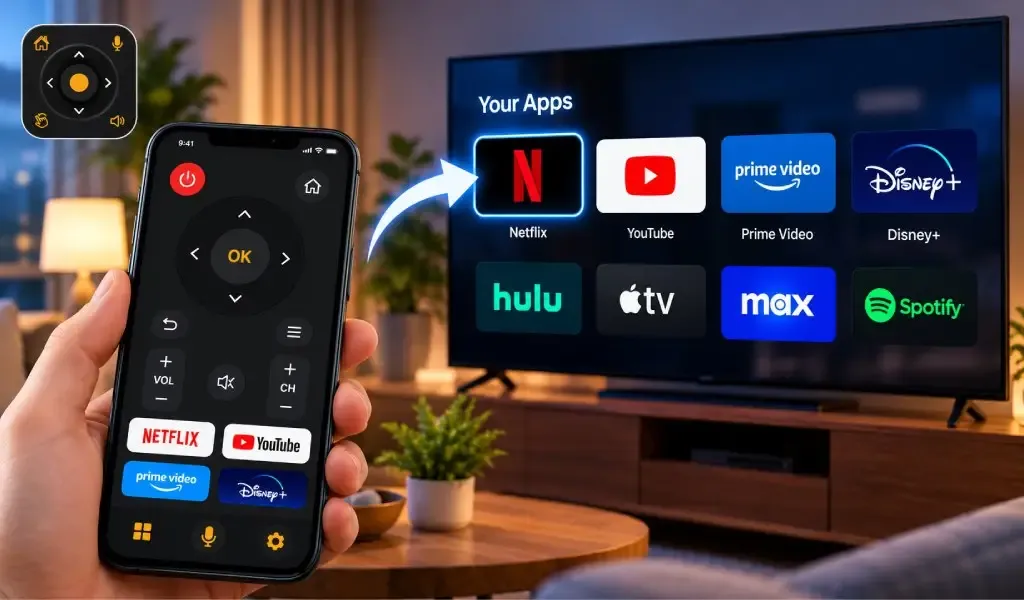
Yes, a phone TV remote can launch apps directly on some compatible Smart TVs. Instead of navigating through the TV's home screen with a physical remote, a supported remote app can provide access to installed TV apps from your phone.
This can make opening streaming services such as Netflix, YouTube and other supported apps much faster. However, app launching is not identical on every television. The available controls depend on the TV brand, operating system, model and the remote functions exposed by that TV.
The Universal TV Remote Control app supports App Control for compatible Smart TVs. Its current Google Play listing also includes voice search, trackpad navigation and keyboard support, while its Apple App Store listing specifically says users can access apps installed on the TV.
Can a phone TV remote launch apps directly?
Yes, a compatible phone TV remote can launch or access supported TV apps when the television exposes app control through its remote interface.
The basic idea is simple. Your phone connects to the compatible Smart TV, the remote app identifies the available controls, and you use the phone interface to navigate or access supported applications.
Depending on the television, this can mean:
- Opening an installed streaming app
- Selecting an app from the TV home screen
- Using app shortcuts
- Navigating through installed apps
- Searching within an app using the phone keyboard
- Using voice search where supported
- Returning to the TV home screen and switching between apps
The exact experience varies because Smart TVs do not all use the same operating system or remote control system.
The Universal TV Remote Control website currently describes the app as providing control of volume, channels, apps, navigation and media playback, while its Google Play listing explicitly includes App Control.
How does app control work from a phone?
App control works by sending supported commands from the phone to the TV over the connection used by the remote app.
For compatible Smart TVs, the Universal TV Remote Control app uses WiFi. The phone and TV connect to the same local network, the app discovers the television, and supported commands can then be sent to it.
The process generally looks like this:
Phone → WiFi → Smart TV → TV operating system → Installed app
The phone is not streaming Netflix or YouTube to the television simply because you pressed an app button. Instead, the remote is telling the TV to open or navigate to an application that the TV already supports.
This distinction is important because app launching and casting are different functions.
A remote app may tell the TV to open an installed application, while casting sends compatible content from another device to the TV.
Can you open Netflix on a TV from your phone?
Yes, you may be able to open Netflix from your phone when the TV and remote app support app control and Netflix is installed on the television.
For example, you could use the phone remote to navigate to Netflix instead of using the physical remote to move through the Smart TV home screen.
But there is an important limitation: the remote app cannot install Netflix on a television that does not have it.
The TV's operating system controls which applications are available. If Netflix is not installed, unavailable in that TV's app store, or restricted by the television platform, a remote app cannot simply create it.
This is why app control should be understood as control of supported TV applications, not access to every application available on a phone.
The Universal TV Remote Control App Store listing specifically says that the app can access apps installed on the TV.
Can you open YouTube from a phone TV remote?
Yes, YouTube can be accessed from a phone remote when the compatible TV supports the application and the remote connection exposes the necessary app controls.
The same principle applies to other streaming services.
The phone remote can help you reach an application, but the television remains responsible for running it.
Once YouTube is open, additional remote functions may allow you to navigate menus, move through content, enter text, adjust volume or use other supported controls.
This is where phone based remotes can become particularly useful. Searching for videos with a physical TV remote can involve repeatedly moving through an on screen keyboard. A phone remote with keyboard support can make text entry considerably faster.
The Universal TV Remote Control Google Play listing specifically identifies an easy keyboard alongside App Control and trackpad navigation.
Does app control work the same way on every Smart TV?
No, app control does not work exactly the same way on every Smart TV because different televisions use different operating systems, remote protocols and application systems.
For example, Samsung uses Tizen on supported TVs, LG uses webOS, Roku TVs use Roku OS, and many other televisions use Android TV or Google TV.
Your phone remote therefore has to work with the control capabilities exposed by the particular TV.
The Universal TV Remote Control App Store listing currently identifies support for Roku OS, Fire TV OS, Android TV OS, Samsung Tizen OS, Viziacast OS and Vidaa OS.
This explains why an app control option may look different on two televisions even when both are Smart TVs.
It also explains why a universal remote does not necessarily display exactly the same buttons for every TV.
For more detail, see why TV remote apps have different buttons for different TVs.
Can a universal remote app launch every TV app?
No, a universal remote app cannot necessarily launch every application on every television.
There are several reasons.
First, the application must exist on the TV.
Second, the television must expose a supported method for accessing or launching it.
Third, the remote app must support the relevant TV platform and control commands.
Fourth, the app itself may provide different functionality depending on the connected TV model.
This is why the phrase App Control should not be interpreted as "control every app on every TV."
It means that compatible Smart TVs can expose application related controls that the remote app can use.
Your Universal TV Remote Control app supports a broad range of TV brands and platforms, but its official listings also make clear that supported features depend on the TV.
Why can app launching work on one TV but not another?
App launching can work on one TV and not another because the televisions may expose different application controls even if they are both compatible with the same remote app.
For example, two televisions might both have Netflix installed but use completely different operating systems.
One TV may expose a direct application command.
Another may require navigation through its home screen.
A third may provide only basic remote controls through the supported network interface.
TV model and software version can also affect what the remote app can access.
This is one reason universal remote applications need to adapt their controls rather than presenting one identical interface for every television.
Your existing guide on how to know if your TV is compatible with a universal remote app explains why compatibility depends on more than simply knowing the TV brand.
Can the phone keyboard make TV app control easier?
Yes, a phone keyboard can make Smart TV app navigation much easier when the TV supports text input through the remote connection.
Consider searching for a movie on Netflix or YouTube.
With a physical remote, you may need to move a cursor across an on screen keyboard letter by letter.
With a phone remote that supports keyboard input, you can type using the smartphone keyboard instead.
The Universal TV Remote Control app lists keyboard support for Smart TVs, alongside trackpad navigation and voice search.
This does not mean the phone keyboard replaces the entire TV application interface. It simply provides a faster input method where the television supports it.
You can also read how to use the keyboard and D Pad in Universal TV Remote Control for a closer look at phone based navigation.
Can voice search open or control TV apps?
Voice search can make TV app navigation faster when the connected television supports compatible voice commands.
Instead of typing a title manually, you may be able to speak a search term through the phone's microphone and send the supported command to the TV.
However, voice functionality depends on the TV platform and the commands exposed by that television.
The current Universal TV Remote Control Google Play listing includes Voice Search & App Control among its Smart TV features.
Voice search and app launching are therefore related but not identical features.
Voice search handles spoken input.
App control handles supported application access.
A compatible TV may support both, but the exact behavior can vary.
Can a phone remote launch apps on Samsung, LG, Roku and Android TV?
Yes, compatible TVs from different platforms can provide app access through a phone remote, but the available method and controls can differ.
Samsung Smart TVs
Samsung Smart TVs use Tizen on supported models. A compatible remote app may provide access to supported TV apps and navigation functions, but the available controls depend on the model and its software.
LG Smart TVs
LG Smart TVs use webOS on supported models. App navigation and other Smart TV functions can therefore differ from Samsung or other platforms.
Roku TVs
Roku TVs use Roku OS and have their own application and navigation environment. Roku also has specific network settings that can affect how third party remote applications interact with the TV.
Your existing Onn TV remote guide demonstrates why this matters: Onn televisions can use different platforms, including Roku and Google TV, and the available controls can consequently differ.
Android TV and Google TV
Android TV and Google TV can provide their own Smart TV application environments and remote functions. Compatible remote apps can use supported controls for navigation, text entry, voice search and application access.
The Universal TV Remote Control listing identifies Android TV and Google TV among its supported Smart TV platforms.
Does launching an app mean the phone controls everything inside it?
No, launching an app does not automatically mean that every function inside the application can be controlled from the phone remote.
There are several layers of control:
Opening the app: The TV launches the application.
Navigating the app: The remote sends supported directional or selection commands.
Typing: The phone keyboard can provide text input where supported.
Voice search: The TV may accept compatible voice commands.
Playback: Play, pause, rewind and fast forward may be available when supported.
The exact combination depends on the TV and its application interface.
This distinction is particularly important with streaming services because an app may support basic navigation while exposing fewer specialized controls through a third party remote.
Can a phone remote launch apps without WiFi?
For Smart TV app control, WiFi or another supported communication method is normally required because the phone has to communicate with the television.
The Universal TV Remote Control app's Smart TV setup requires the phone and TV to connect to the same WiFi network.
An IR blaster is different.
IR can send traditional remote commands directly to a compatible television, but it does not provide the same Smart TV network functionality as WiFi based control.
That means you should not assume that an IR enabled phone can automatically launch Smart TV applications in the same way as a network connected remote.
For more information, see can a TV remote app work without an IR blaster?.
Is launching apps from a phone faster than using the physical remote?
It can be faster when the remote app provides direct app access or shortcuts and the phone is already connected to the TV.
The biggest advantage is not necessarily that the phone has more buttons. It is that the phone can combine several input methods in one interface.
You can potentially use:
- Touch controls
- D Pad navigation
- Keyboard input
- Voice search
- App controls
- Playback controls
- Volume controls
- Input selection
This can reduce the amount of menu navigation required for common Smart TV tasks.
Competitor remote apps are increasingly emphasizing quick app launch as a major feature, showing that direct access to streaming applications is becoming an important part of the phone remote experience.
The useful distinction is that a good universal remote should not simply reproduce a physical remote. It should take advantage of the smartphone's additional input capabilities when the TV supports them.
What should you check if app launching does not work?
If your phone remote cannot open a TV app, first check the TV connection and compatibility rather than assuming the application itself is broken.
Check these points:
- Make sure the phone and Smart TV are connected to the same WiFi network.
- Confirm that the TV supports the remote app.
- Check whether the application you want to open is actually installed on the TV.
- Confirm that the TV is connected to the network.
- Reconnect or rediscover the TV in the remote app.
- Check whether the TV has network or mobile remote control settings that need to be enabled.
- Make sure the TV software is up to date.
- Check whether another TV model exposes different app controls.
If the TV cannot be found at all, that is a discovery problem rather than an app launching problem. Our guide on why a TV remote app says No TV Found covers the most common causes.
What is the difference between app launching and casting?
App launching opens an application on the TV, while casting sends supported content from a phone or another device to the TV.
For example, if you launch YouTube through a compatible remote, the TV opens its YouTube application.
If you cast a YouTube video from your phone, the phone may send the selected content to the TV through a supported casting system.
These functions can appear together in a modern TV remote app, but they are technically different.
The Universal TV Remote Control Google Play listing currently identifies both App Control and casting as Smart TV features.
Understanding the difference helps explain why a remote app can control a TV without necessarily mirroring the phone screen.
Can one phone control apps on multiple TVs?
Yes, a universal remote app can be used with multiple compatible TVs, although each television can expose different controls.
For example, the same phone could be used with a Samsung TV in one room and a Roku or Android TV in another.
The remote application still needs to connect to the appropriate television before sending commands.
Because the TVs can use different platforms, the available app controls may not look identical.
That is actually one of the main advantages of a universal remote app: you do not necessarily need a separate physical remote for every compatible television.
The Universal TV Remote Control app is designed for a broad range of TV brands and platforms, with its current listings reporting support for more than 100 TV brands and a wide selection of Smart TV operating systems.
Frequently Asked Questions
Can a phone TV remote launch apps?
Yes, a compatible phone TV remote can launch or access supported apps on Smart TVs when the TV exposes app control and the application is installed. The exact behavior varies by TV model and operating system.
Can I open Netflix on my TV using my phone?
Yes, if the compatible TV has Netflix installed and the remote app supports the TV's application controls. The phone sends supported commands to the TV rather than running the Netflix app itself.
Can a universal remote app open YouTube?
Yes, compatible Smart TVs can provide access to YouTube through supported remote controls. Whether the app can open YouTube directly or requires navigation through the TV interface depends on the television and its supported remote functions.
Why can app control work on one TV but not another?
Different TV brands and models use different operating systems and remote protocols. A Samsung Tizen TV, LG webOS TV, Roku TV and Android TV can therefore expose different application controls to a remote app.
Does my phone need WiFi to launch TV apps?
For WiFi based Smart TV control, the phone and TV generally need to communicate over the same local network. The Universal TV Remote Control app's Smart TV mode requires the phone and TV to be connected to the same WiFi network.